Some GTA 6 Players Say the Graphics Got Worse After the First Update — What We Know
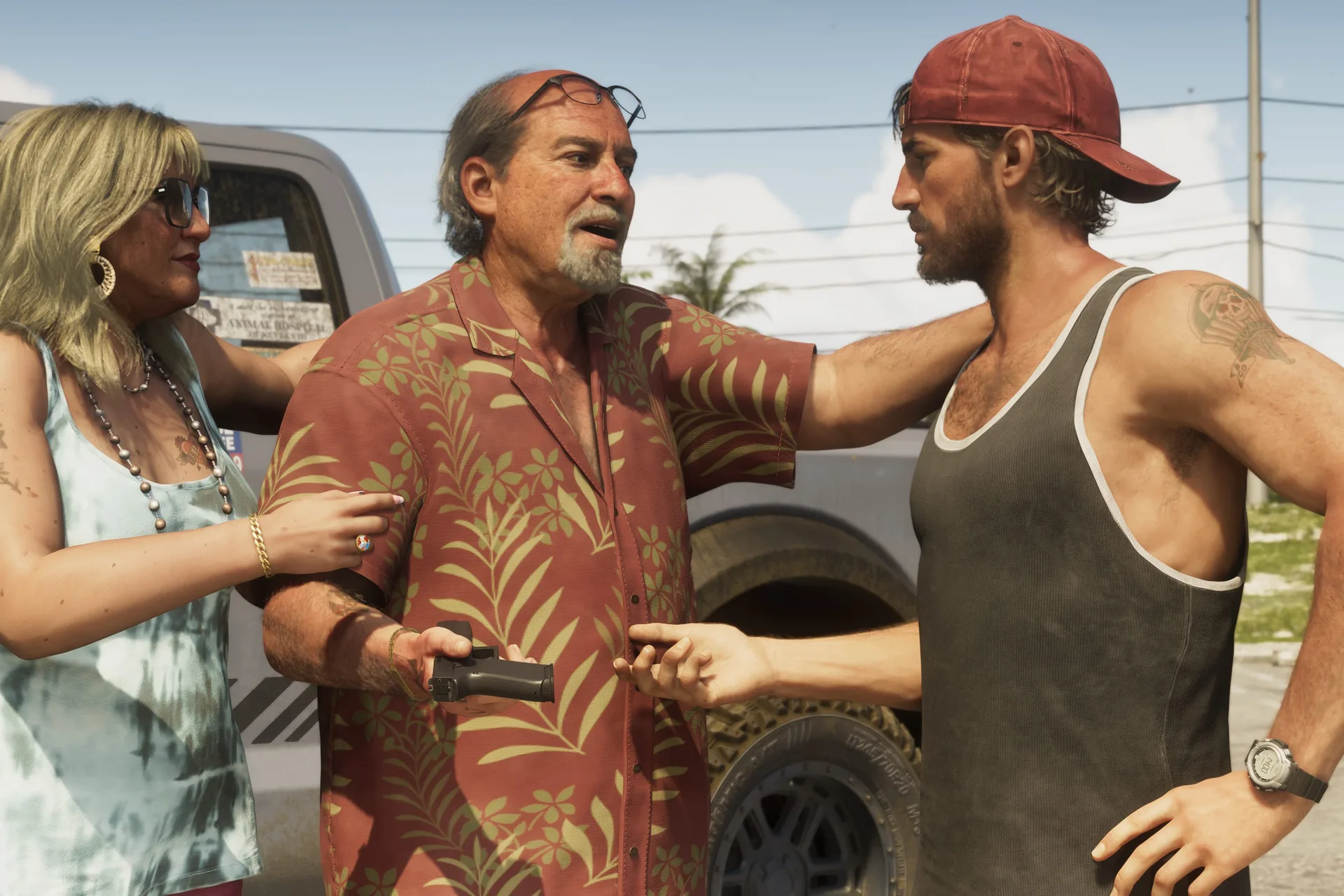
Some GTA 6 players on PS5 and PS5 Pro say the game looks worse since its first update. They report blurrier textures, more objects popping into view late, and lighting that has lost its wow factor — and they blame update 01.002.002, which Rockstar released on November 23. Rockstar has not said anything about graphics changes, and not every player sees a difference. Here is what is actually being reported, and what you can try if your game looks soft.
Quick summary
- Some PS5 and PS5 Pro players report softer graphics after update 01.002.002, which arrived on November 23 and fixed crashes and static weather.
- The complaints are blurry textures, more pop-in, weaker lighting, pixelated clouds and flat sunrises and sunsets — mostly noticed on PS5 Pro.
- Rockstar has not commented on any graphics change, and the patch notes did not list one. This is player reports, not a confirmed downgrade.
- Some players say a quick console resolution reset fixed it for them — set the PS5 resolution to 1080p, back to Automatic, then restart.
- If your game looks hazy, check for the update and try the fix below before assuming the worst — some of the softness may be how the game renders, not a bug.
What are players reporting?
Since the November 23 update, Reddit has seen a growing number of threads from players who say GTA 6 looks worse than it did on launch day. The reports, collected by Notebookcheck, describe blurry textures, objects popping in later than before, and global illumination — the way light bounces around a scene — that looks less convincing.
PS5 Pro owners report the most detail, because the Pro version renders the most detailed version of Leonida. Players say sunrises and sunsets have lost the wow factor they had on release day, clouds look pixelated, and the reflections left by rain on water disappoint. One player, Dem5869, wrote that after the update, "lighting, textures, and hair look completely different". Another, DrGonzoRoyale, said a more aggressive depth of field — the blur effect on distant objects — makes far-away things look smeary, and that the faces and hair of Jason, Lucia and NPCs look less defined. The poster claims screenshots prove the differences are not just imagined.
Not everyone agrees. Plenty of players say their game looks the same as before, which is why this is a report about what some players see, not a confirmed change.
Did Rockstar secretly downgrade the graphics?
There is no proof of that. Update 01.002.002 was a small patch — about 600 MB on PS5 and 1.6 GB on Xbox — and its listed fixes were crashes, the static weather bug and other stability issues. The patch notes did not mention graphics or performance changes at all.
The speculation is that Rockstar may have quietly trimmed visual quality to ease the load on consoles. GTA 6 targets 30 frames per second on every console with no graphics or performance mode to choose from, and Digital Foundry recorded frame-rate drops in crowded scenes even before the patch. A cutback in visual detail would ease the strain — and players note the game has already been linked to overheating reports on Xbox consoles. Some players also suspect the PS5 Pro's upscaling — PSSR 2, Sony's AI-based technique for sharpening the image — may have changed, which would explain why objects look less sharp.
All of that is guesswork. Notebookcheck's own advice is blunt: until Rockstar comments on any performance tweaks, it is wise not to draw conclusions. Digital Foundry and other analysts are still testing the game, and their measurements will settle it better than screenshots and impressions.
Is there a fix if your game looks blurry?
If your GTA 6 looks hazy or smeared, try this first — it has worked for some players, though not everyone. On your PS5, go to Settings, then Screen and Video, then Video Output, and set Resolution to 1080p. Set it back to Automatic, then restart the console from the power options. Several players in the Reddit thread say the haze was gone when they relaunched the game after doing this. Others say it made no difference, including at least one player on Xbox Series X, so treat it as something worth trying, not a guaranteed fix.
Two more things to try: lower the Motion Blur Strength slider in the game's Display settings a little at a time — setting it to zero can make camera movement look jittery — and fully restart the game and the console, which clears temporary glitches. And remember that some softness is built into how the game renders. Digital Foundry found that the base PS5 renders GTA 6 at around 1440p and upscales it to 4K, so distant detail will never look razor-sharp on a big 4K TV, update or no update.
Has this happened before?
Yes — and that is reassuring. When Red Dead Redemption 2 launched on PS4 Pro, patch 1.06 produced very similar complaints about less convincing lighting and shadows. A later patch, 1.09, brought HDR refinements that largely cleared them up. Rockstar has a track record of fixing this kind of thing quietly in a follow-up patch. If the softness is real, the most likely outcome is a fix in a future update, not a permanent downgrade.
What it means for you in India
If you play on PS5 Pro — which costs ₹79,990 in India — you are the most likely to notice the difference, since the Pro renders the sharpest image. On a base PS5 (the Slim Digital is ₹64,990), the change, if there is one, is subtler. Either way, do not rush to change your TV settings or reinstall the game. First make sure you are on update 01.002.002, try the resolution reset above, and keep an eye on Rockstar's support page for the next patch. If you had crashing problems instead, our GTA 6 PS5 crash fix guide covers error CE-108255-1, and our best GTA 6 settings explain the display options that affect clarity.
Frequently asked questions
Did GTA 6's first update make the graphics worse?
Some PS5 and PS5 Pro players say so, reporting blurrier textures, more pop-in and weaker lighting after update 01.002.002. Rockstar has not confirmed any graphics change, and not all players see a difference, so it is reported, not confirmed.
What changed in update 01.002.002?
The November 23 patch fixed crashes, the static weather bug and other stability issues. It was about 600 MB on PS5 and 1.6 GB on Xbox. The patch notes did not list any graphics or performance changes.
How do I fix blurry graphics in GTA 6 on PS5?
Try the resolution reset: set your PS5 resolution to 1080p, back to Automatic, then restart the console. Some players say this cleared the haze. You can also lower the Motion Blur Strength slider in the game's Display settings.
Is the problem only on PS5 Pro?
Most reports come from PS5 Pro owners, because the Pro renders the most detailed version of the game — but base PS5 players have reported softness too, and some Xbox players as well.
Has Rockstar said anything about the graphics reports?
No. As of November 28, Rockstar has not commented on the reports or on whether update 01.002.002 changed anything visual.
Related articles
 GTA 6's Best-Kept Secret: Rockstar Finall…
 Vermintide 2 Just Handed Modders Its Full…
 Silksong's Sea of Sorrow DLC Is Free and…
 GTA 6 Is Reportedly Breaking Xbox Series…